Analytics
The Analytics section provides a list of your analytics reports. The list includes preformatted reports, custom reports you create and save using Custom Ad Hoc or Premium Analytics, and Premium Analytics reports that other users may have sent to you.
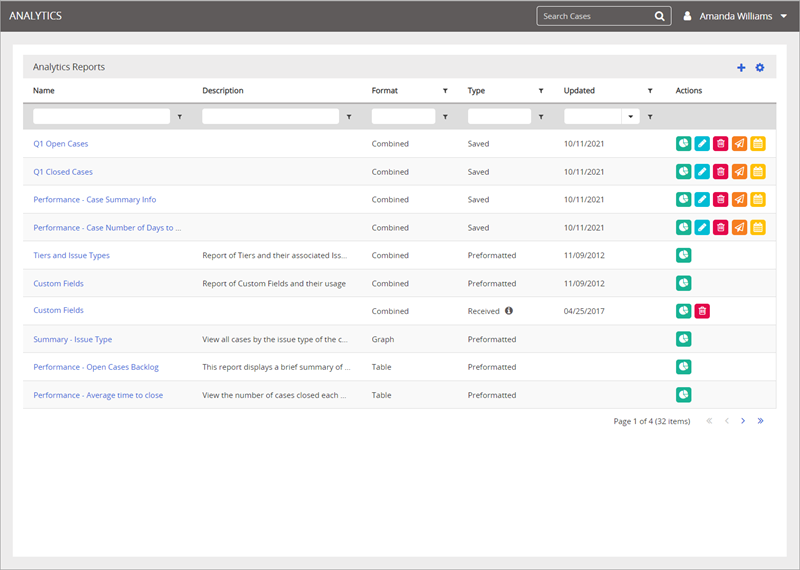
There are four main areas of the Analytics page that give you access to all of your Analytics data and tasks.
Analysis Grid
This is where you see the list of reports when you first open the Analytics page. All reports are listed, and can be sorted using column filtering and sorting functionality.
Add New Report
The + icon is where you go to create a new report. The types of reports you see in the menu depend on your permissions.
Settings
The  icon gives you access to settings, including show / hide columns, number of reports to show on each page, and the option to reset your Analytics grid to default settings.
Action Buttons
The Action buttons allow you to run, edit, delete, send, and schedule reports buttons. The action buttons available depend on the report type and settings.
 Product Information
Copyright
Product Information
Copyright
Copyright © 2025 NAVEX Global, Inc. NAVEX Global® is a registered trademark/service mark of NAVEX Global, Inc. The NAVEX Global® logo is a trademark/service mark of NAVEX Global, Inc. Unauthorized use of NAVEX Global, Inc.’s trademarks/service marks is strictly prohibited without prior written permission from NAVEX Global, Inc.